
Product
Intelligent email filing for ProLaw®.
EasyFiler watches a shared mailbox and files every email and attachment into ProLaw® automatically — pulling Matter IDs from seven different sources, learning from your filing history, and putting anything it can't resolve into a review queue instead of dropping it.
How it works
Attorneys forward emails to a shared mailbox. EasyFiler handles everything from there.
Forward to a filing address
Anyone at the firm — attorneys, paralegals, assistants — forwards an email to the shared filing mailbox. That's the only step a person takes.
EasyFiler scans and detects
Every two minutes, EasyFiler processes new messages. It works through eight detection methods in sequence — subject line, email body, attachment filenames, attachment text content (including OCR for scanned documents), thread-based routing, learned sender patterns, ProLaw contacts, and custom field lookups — until it finds a valid Matter ID.
Filed as a ProLaw® event
The email body and all attachments are created as a linked ProLaw event. Emails that match multiple matters are filed to all of them. Emails that cannot be matched are moved to a review queue — not dropped.
Eight ways to find a Matter ID
EasyFiler works through each method in order until it finds a match. The further down the chain it needs to go, the smarter the detection.
Subject line
The first place EasyFiler looks. It scans the subject using your firm's configured Matter ID patterns — whatever format your matters use.
Email body
If the subject comes up empty, EasyFiler scans the message body using the same patterns. Useful when the ID appears inline in the message text.
Attachment filenames
EasyFiler checks the name of every attachment for a Matter ID before opening the files themselves.
Attachment content
EasyFiler extracts text from Word documents and PDFs. For scanned images and scanned PDFs, it uses Azure Computer Vision OCR. If the Matter ID is anywhere in the document — even a handwritten notation on a court filing — EasyFiler finds it.
Thread routing
If a prior email in the same conversation thread has already been filed successfully, EasyFiler routes the reply or forward to the same matter automatically — no Matter ID required. Only applies to conversations that arrived after EasyFiler was deployed.
Sender intelligence
EasyFiler learns from every successful filing. When a sender's emails have been consistently filed to the same matter, it builds a confidence score for that pairing. Once the score clears the threshold, future emails from that sender file automatically — no Matter ID required in the email.
ProLaw contacts
EasyFiler checks whether the sender's email address is on file as a ProLaw contact linked to a matter.
Custom field lookup
For firms whose correspondence references claim numbers, policy numbers, or court index numbers rather than ProLaw matter IDs, EasyFiler can extract those identifiers from the email and look them up against any ProLaw custom tab field — filing to the matched matter automatically.
Sender Intelligence
It gets smarter the more you use it.
Every successful filing teaches EasyFiler something. It tracks which senders file to which matters, how often, and how recently — and builds a confidence score for each pairing. When a sender's score clears the threshold, their emails file automatically even when there's no Matter ID anywhere in the message or attachments.
This is especially useful for recurring correspondence: opposing counsel who always references the same case, court filings from a clerk's office, or vendor invoices tied to a specific matter. Over time, EasyFiler handles an increasing share of your volume without any subject line discipline required.
See everything in one place.
The EasyFiler dashboard gives your team visibility into every filing — what succeeded, what's pending review, and why.
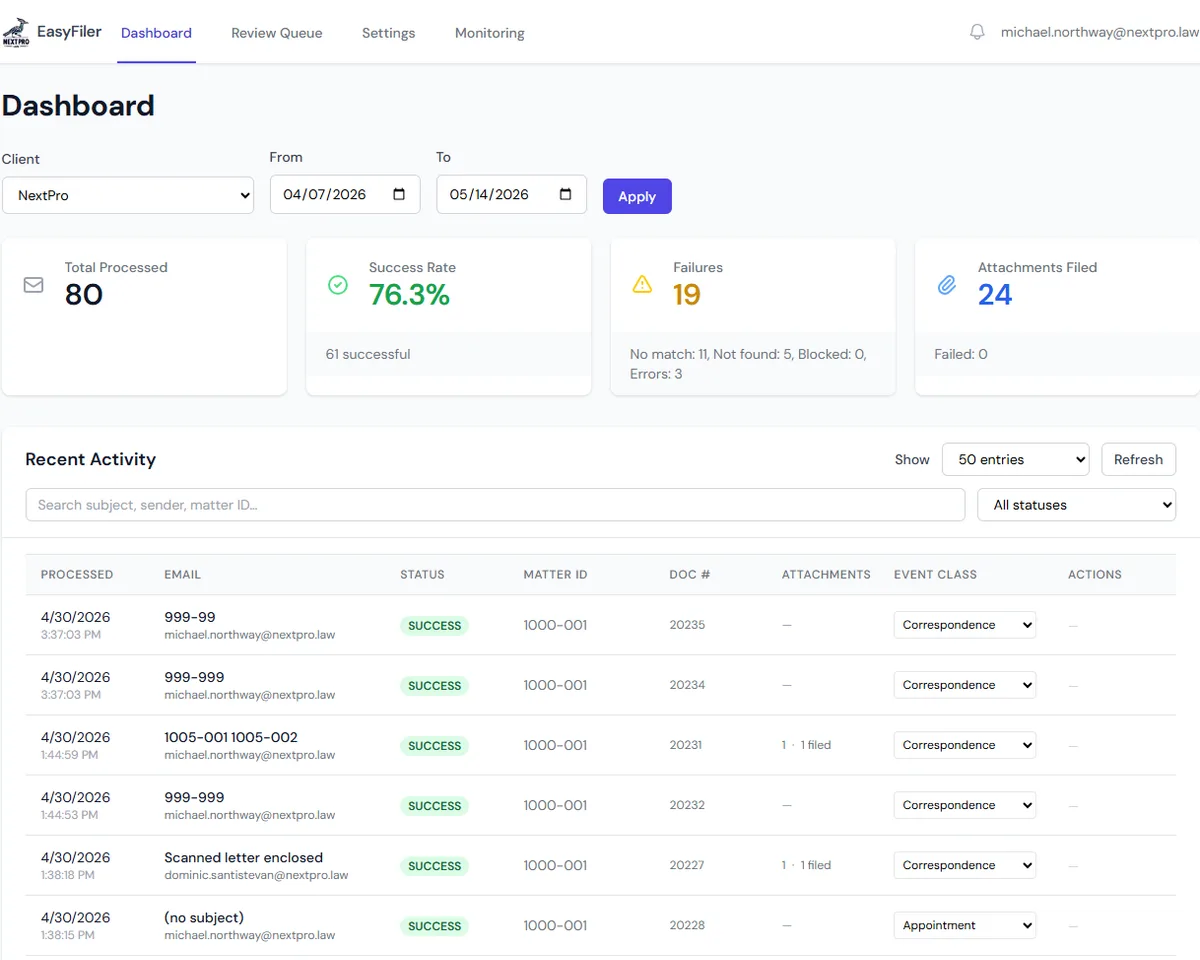
EasyFiler dashboard — real-time stats, per-email status, and the review queue for anything that needs attention.
What the dashboard gives you
Built for the people who need to know the filing is getting done — and the people who need to fix it when it isn't.
In-line event class editing
Change a ProLaw event class directly from the activity feed. EasyFiler updates the filing folder in ProLaw immediately — no need to open the desktop client.
Real-time filing stats
Total processed, success rate, failures, and attachments filed — for any date range, refreshed every 30 seconds.
Full activity feed
Every email EasyFiler touches is logged: sender, subject, matched matter, detection method, status, attachments, and processing time. The Detected Via column shows exactly which stage matched each email — useful for tuning higher-priority detection methods. Searchable and filterable.
Review queue
Emails that couldn't be auto-filed land here instead of disappearing. Staff can see the failure reason, enter the correct matter ID, and refile in a single click. Batch actions let you refile a group to a single matter, clear items in bulk, or export the list to CSV.
Detect from ProLaw
Not sure what pattern your firm's matter IDs follow? EasyFiler can analyze your existing ProLaw matter IDs and suggest the correct regex pattern automatically. No IT involvement, no manual regex writing — setup takes seconds.
Per-client settings
Matter ID patterns, sender domain filters, custom field identifiers, attachment scanning depth, notification preferences, and cleanup rules — all configurable per firm without touching the code.
Health and alerting
Circuit breaker status for each active client. Slack and email alerts for critical errors. Application Insights integration for deeper diagnostics.
Automatic retry
If ProLaw is temporarily unavailable, EasyFiler retries failed filings automatically on an escalating schedule. No manual intervention needed — filings complete as soon as ProLaw is back.
Sender domain filtering
Only emails from authorized sender domains trigger filing. Unauthorized emails are held for review rather than auto-filed — keeping your ProLaw data clean and protecting against misfiled correspondence.
Outlook Add-In
File without forwarding.
The EasyFiler Outlook add-in puts a "File to ProLaw" button directly in the Outlook ribbon. Click it on any email and EasyFiler reads the message, detects the matter, and files it — no shared mailbox, no forwarding step required.
Works in Outlook on the web and Outlook desktop. After filing, an inline edit panel lets you update the event class, notes, and short note without opening the ProLaw desktop client. Batch filing lets you select multiple emails at once — an "Include attachments" checkbox controls whether attachments are filed as child events or just the email bodies. The add-in is an optional complement to the shared mailbox workflow — not a replacement.
Requirements
EasyFiler is a hosted service. Nothing is installed locally.
Frequently asked questions
- What email platform does EasyFiler require?
- EasyFiler works with Microsoft 365 (Exchange Online). It connects to a dedicated shared mailbox using the Microsoft Graph API with admin-consented permissions. No changes to individual attorney mailboxes are required.
- What happens when EasyFiler can't find a Matter ID?
- The email is moved to a review subfolder — nothing is deleted or silently dropped. The dashboard's Review Queue shows the failure reason and gives staff a one-click path to enter the correct matter and refile.
- How does the Sender Intelligence feature work?
- Every time EasyFiler successfully files an email, it records the sender-to-matter mapping. Over time it builds a confidence score based on frequency and recency. When a sender's score clears the threshold, their emails auto-file to that matter even with no Matter ID in the subject or body. The system gets more accurate the longer it runs.
- Can a single email be filed to more than one matter?
- Yes. If EasyFiler finds multiple valid matter IDs at any detection level, it creates a ProLaw event on each one. This handles situations like a chain email involving related matters or an attachment that references two case numbers.
- Does EasyFiler require anything installed on our server or workstations?
- EasyFiler itself is a cloud-hosted service running in Azure — there is nothing to install on workstations. However, it connects to ProLaw® through the NextPro Reach API, which does need to be installed and running on your ProLaw® server.
- Is there an Outlook add-in?
- Yes. The EasyFiler Outlook add-in puts a "File to ProLaw" button directly in the Outlook ribbon. Click it on any email and EasyFiler reads the message, detects the matter, and files it — no forwarding to a shared mailbox required. Works in Outlook on the web and Outlook desktop. After filing, an inline edit panel lets you update the event class, notes, and short note without opening ProLaw.
Ready to automate your email filing?
Contact us to get EasyFiler configured for your firm. Onboarding takes one session.
Get in touch